
OneClick Chat to Order
Add a Buy via WhatsApp button to your WooCommerce store and let customers order in one tap, with the product name, price, and link already written into the chat. Free on WordPress.org and active on 40,000+ stores.
Free Download - Join 40,000+ Online Stores
Turn product pages into WhatsApp orders.
OneClick Chat to Order is a free plugin that connects WooCommerce to WhatsApp. One click opens a chat with your number, pre-filled with the exact product details, so you answer questions, confirm stock, and close the sale in the same conversation.
Everything a chat-first store needs
Every feature ships in the free version. No trials, no locked tabs.
Create unlimited numbers and route them by store area, product, or department: sales on product pages, support on the floating button, orders on the cart.
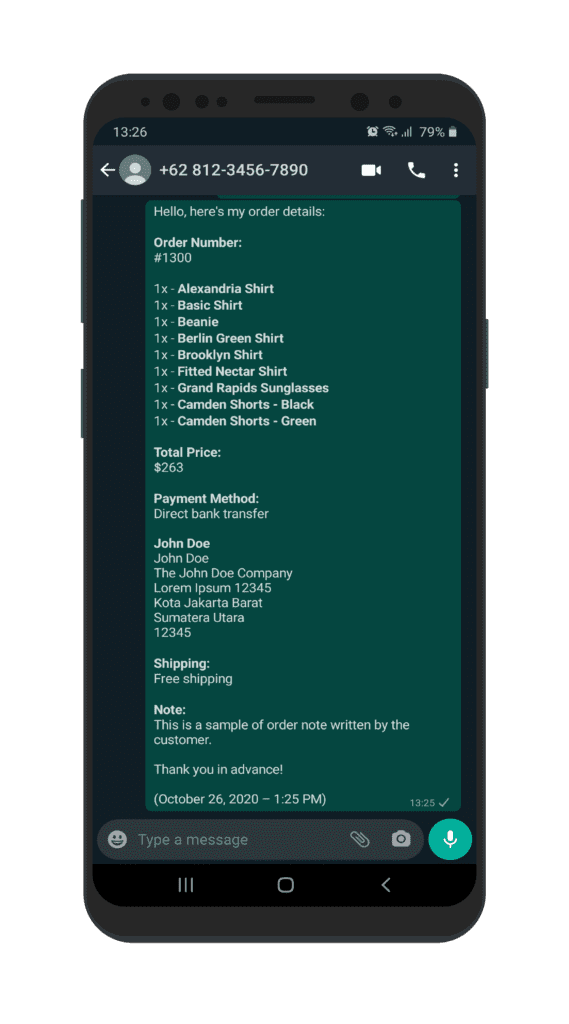
Messages carry the product name, price, quantity, variations, coupons, shipping, and totals, pulled straight from WooCommerce. Every label can be reworded in your own language.
Place the button after Add to Cart, under it, after the short description, after the product summary, or around the share area. A shortcode covers everywhere else.
A Complete Order via WhatsApp button on the cart page, working on both the classic shortcode cart and the React-based Block Cart. You can hide Proceed to Checkout entirely.
Right after checkout, customers send you their complete order summary in a single tap: order number, items, addresses, and a payment link.
Show a consent checkbox with a link to your privacy policy before the chat opens. The button stays disabled until the customer agrees.
One plugin, every touchpoint
Decide exactly where WhatsApp appears, and where it does not.
Details you control
Choose the base URL per device: api.whatsapp.com, web.whatsapp.com, or the whatsapp:// protocol. Or force wa.me everywhere for one consistent behavior.
Rename every label in the message, from price to shipping, and translate the lot. The plugin is translation-ready and ships a WPML configuration.
Color pickers with alpha, hover states, box shadows, margins, and padding for both the product button and the floating button. No CSS required.
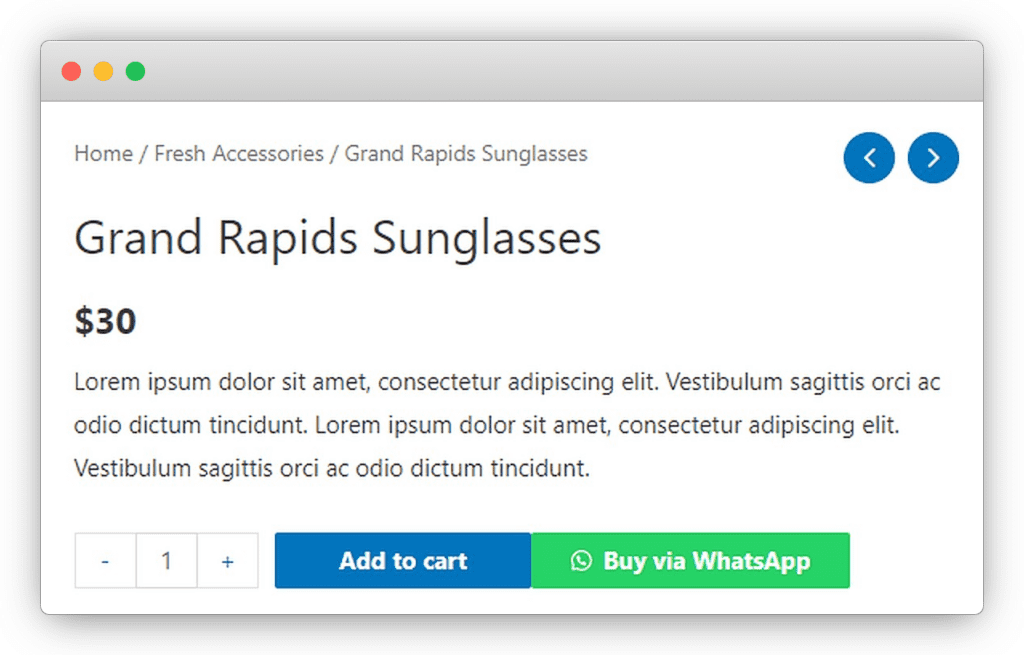
Product pages
Shop and archives
Cart and thank-you
Anywhere else
Selling with vendors?
The Dokan, WCFM, and WC Vendors connectors let each vendor receive WhatsApp orders on their own number, straight from their own products.
Why 40,000+ stores run it
Free without a catch
All features included, unlimited numbers, unlimited sites. GPL-licensed and distributed on WordPress.org.
Maintained and hardened
Updated continuously since 2019, with prompt fixes for responsibly disclosed security reports, plus HPOS and Block Cart support.
Built for developers too
Around 100 documented wa_order_filter_* hooks let you rewrite numbers, messages, buttons, and output without touching core files.
Live in minutes
Add a number, tick a checkbox, done. No API keys, no signup, no external dashboard.
Private by design
Chats happen inside WhatsApp. The plugin stores only your settings, never customer messages, and it calls no external service.
Support without a paywall
Documentation for every settings tab, a video walkthrough, and questions answered on the WordPress.org support forum. No premium support tier required.
Start taking WhatsApp orders today
Install from WordPress.org, add your number, and your first chat-to-order button is live before your coffee cools.
See the full setup on video
The complete overview and tutorial, from installing the plugin to your first WhatsApp order.
 Watch the tutorial video
How WhatsApp ordering works in WooCommerce
The flow takes three steps and needs no WhatsApp Business API account.
You add your WhatsApp number in the plugin settings; any personal or WhatsApp Business number works, because OneClick Chat to Order uses standard wa.me and api.whatsapp.com links.
A customer clicks the button on a product page, the shop grid, the cart, or the order confirmation page.
WhatsApp then opens with the order pre-filled, and the customer just presses send.
Because the message is generated from live WooCommerce data, it can include variations, coupon codes, tax, shipping details, and order totals, each with labels you can rename or translate.
You close the sale in chat: confirm stock, arrange payment or cash on delivery, and answer questions in the same thread.
Chat widget or chat to order?
A chat widget starts an empty conversation; OneClick Chat to Order starts an order.
The opening message already carries the product context, so neither side has to ask which product is meant.
Buttons render on product pages in five selectable positions, on the shop loop, on the classic and Block Cart, on the thank-you page, and anywhere else via shortcode.
Each placement can use a different WhatsApp number: sales, support, or one number per vendor with the Dokan, WCFM, and WC Vendors add-ons.
Who it is for, and who it is not for
Stores in chat-first markets such as Indonesia, India, Brazil, and much of Southeast Asia, the Middle East, and Latin America sell this way every day.
The pattern converts well for cash on delivery, made-to-order products, price negotiation, and anything a buyer wants to ask about before paying.
A chat removes the two biggest drop-off points of a classic checkout: account creation and online payment friction.
It is the wrong fit if you want automated WhatsApp notifications, bot replies, or bulk messaging.
Those need a WhatsApp Business API service, and OneClick Chat to Order deliberately is not one: it opens conversations that customers start, and a human answers them.
Where to go next
Install the plugin from WordPress.org, add a WhatsApp number under Chat to Order → Numbers, and enable the button on the Basic tab.
The whole setup takes under five minutes.
The documentation covers every tab, the developer reference lists all wa_order_filter_* hooks, and the video above shows the full flow from installation to a first test order.
For variable products, OneClick Variations Grabber sends the customer’s selected variations and quantities into the chat.
Frequently asked questions
Straight answers before you install.
Yes, every feature is free for unlimited stores. Optional paid add-ons exist only for multivendor marketplaces (Dokan, WCFM, WC Vendors) and variation grabbing.
No. The plugin uses standard wa.me and api.whatsapp.com links, so any regular WhatsApp or WhatsApp Business number works. There is no API account and there are no per-message fees.
No. OneClick Chat to Order opens chats that the customer starts. It does not send notifications, bulk messages, or bot replies. Automation like that needs a WhatsApp Business API service, which is a different kind of product.
Yes. Create unlimited numbers, set defaults per store area, and override the number, button text, and message on any individual product.
Whatever you choose: product name, price, URL, quantities, variations, coupons, tax, shipping details, and order totals. Every label can be reworded or translated.
Yes. Version 1.1.1 added support for the Gutenberg Block Cart, and the plugin declares compatibility with WooCommerce High-Performance Order Storage.
Yes. Hide the Add to Cart button globally or per product, and force-show it on specific products when you need exceptions.
It ships a consent flow: an optional checkbox linking to your privacy policy that must be ticked before the WhatsApp button activates. Writing lawful consent text remains your responsibility.
Version 1.1.2 lists WordPress 6.0 or newer, WooCommerce 8.2 or newer, and PHP 7.4 or newer as minimums. WooCommerce must be installed and active.
No external services are called and assets load conditionally: the product-page script loads only on product pages. Phone number lookups are cached.
Something else on your mind? Open a support request